
How to set up Windows SNMP Service
Install SNMP service
Windows Server (2022, 2019, 2016)
- Open Server Manager.
- Select Add roles and features > Features.
- Tick the checkbox next to Simple Network Management Protocol (SNMP). (and optionally SNMP WMI Providers for querying SNMP devices via WMI).
- Click Next > Install.
Windows 11
- Click Start > Settings > System > Optional Features.
- Select the View features button in the Add an optional feature tile.
- Type snmp into the search field.
- Tick the checkbox next to Simple Network Management Protocol (SNMP). (and optionally SNMP WMI Providers for querying SNMP devices via WMI).
- Click Next > Install.
Windows 10
- Click Start > Settings > System > Optional Features.
- Select the Add a feature button.
- Type snmp into the search field.
- Tick the checkbox next to Simple Network Management Protocol (SNMP). (and optionally SNMP WMI Providers for querying SNMP devices via WMI).
- Click Add.
Configure SNMP service
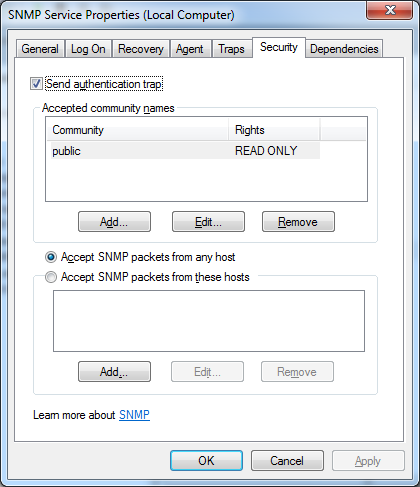
Open "Service/SNMP", select "Security" tab, make sure there is at least one community name. If other hosts need to access this SNMP service, check "Accept SNMP packets from any host".
Please feel free to contact support@ireasoning.com if you have any questions.
Tags: SNMP SERVICE, WINDOWS
~